

ClickOn Smart Access App
The ClickOn mobile application empowers residents with secure, effortless estate living. Managing visitors and contacts, receiving notifications and powerful reporting at their fingertips.
Resident Features
Visitor Processing
Management Portal Tools

Access Control at your Fingertips
The ClickOn mobile application empowers residents with secure, effortless estate living. Managing visitors and contacts, receiving notifications and powerful reporting at their fingertips.
Peace of Mind
Switch between profiles if you own multiple stands or properties across ClickOn-managed estates.
Flexibility
Log in securely with either PIN or biometric validation.
Visitor Invitation
Send visitor codes instantly from the app via WhatsApp, SMS or email.
Location Sharing
Add your home location in the app so it’s automatically included with visitor codes, giving guests simple, exact navigation straight to your premises.
Reporting
Generate access reports for earlier events on your own stand/unit.

Notifications
Manage the send/receive of the unit’s access notifications.
Bluetooth Entry
Seamless Access: Open estate gates with a simple tap using Bluetooth technology.
Document Library
Stay Informed: Access estate communication, newsletters, and important documents—all in one place.
Facility Booking
Book estate facilities via the app, such as tennis courts, squash courts etc.
Incident Reporting
Book estate facilities via the app, such as tennis courts, squash courts etc.
INCLUDED FEATURE
Smart Access App
Complete control in the palm of your hand
ClickOn Smart Access empowers residents with full control over their estate experience. From generating visitor codes to accessing activity history, everything is designed for seamless and secure community living.


Code
Visitor access codes

Access
Bluetooth entry

Facilities
Emergency alert

Key Capabilities
Messages & bookings
Key Capabilities
Generate visitor access codes
Bluetooth gate entry
View activity history
Receive estate messages
Report incidents & issues
Book estate facilities
Access documents
Panic button feature
Available on iOS and Android. Free for all residents
of ClickOn-enabled estates.
APP INTERFACE
Designed Around Residents
Every screen of the Smart Access App is purpose-built for clarity, speed, and security.
.png)
HOVER TO
EXPLORE
Menu bar
Next visitor
code
Quick view of
last 10 activities
Estate and Unit Selections
Activity Reports
Shortcuts
Reporting
Activity Reports
The Activity Report provides access to all activities in your unit. Use the date selector to view a specific period, or use the search bar to find specific details or event types.
Shortcuts
Code
Request and share visitor access codes.
Access
Secure Bluetooth access.
Panic
Send a distress message to security.
Community
Access estate messages, documents, book facilities and log support tickets.
.png)
Code
Get Access Code
Approach the gate, tap once. Hands-free entry across all sub-estates.
1
Choose the code's date and time range.
Either for “Today”, “Tomorrow” or “Custom”.
2
Adjust the “Code Count”
to set the number of times the code will be valid.
3
Share your access code with your visitor
by selecting the "Share" option.
4
Delete or share previously generated codes.
.png)
1
2
3
4
Access
Access Codes
Residents can access sub-estates using the built-in Bluetooth feature. The blue indicator shows that the device is searching for the nearest Bluetooth-enabled keypad. Once it turns green, you can click the button to gain access.
.png)
.png)
Documents
Documents Upload
The estate can share documents with residents by uploading them via the portal. Documents can be viewed and downloaded from this section.
.png)
Notifications
Estate Messages
Estate notifications can be sent directly to the mobile app, where users will receive a push notification. In the Community Estate Messages section, users can view all estate messages. Selecting a message will display its content.
Support Ticket
Department Support Ticket
Support tickets are received by all users in the selected department. Within their mobile app, they can change the status of the ticket and send correspondence. Once a support ticket is resolved, its status can be changed to "Closed".
.png)
SUPPORT TICKET
New Support Ticket
To log a new support ticket, select the type and department, then enter the subject and description. You can add a picture by pressing the camera button. After submitting, the incident will appear in the list, where you can open it to view feedback or add more details.
.png)
.png)
Facilities
Estate Facilities
The Facilities tab will direct the user to a list of all available facilities in your Estate. Selecting the option (e.g. Clubmaster) will automatically open the app on the user's phone. If the app is not found, it will redirect the user to the store to download it.
Support Ticket
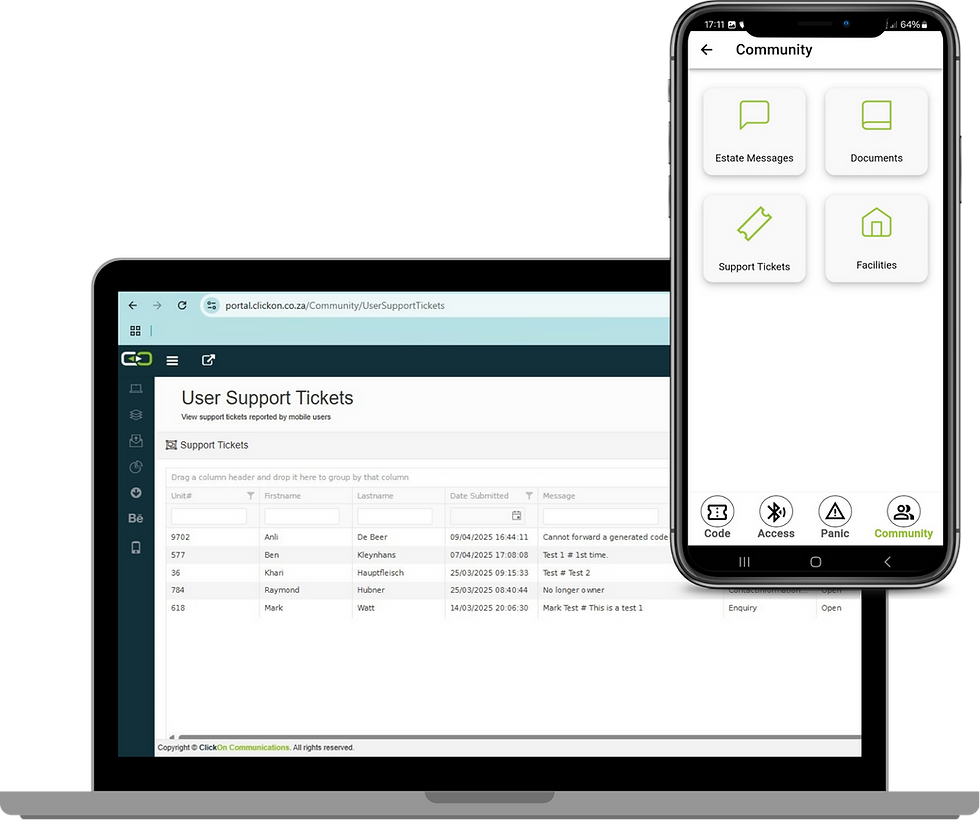
Portal Manager
The ClickOn Portal offers a detailed overview of all support tickets with filtering capabilities and can also be used to send correspondence.
.png)
Indemnity & Invitation
Instead of sending an access code, the resident can now send an invitation with required fields:
ID Number
License Plate
Visitor Count

Visitor QR Codes
Encrypted QR codes for seamless access.
Visitor receives invitation link
Redirects to indemnity form
Accepts indemnity terms
Receives Access Code + QR
Encrypted
Works offline
Zones & Counts
No Migration

Indemnity & Invitation
Instead of sending an access code, the resident can now send an invitation with required fields:

Generate QR
In the Smart Access App

Present to Scanner
Touchless gate entry

10-Second Expiry
Limits ability to share codes

Get ClickOn Smart Access Now
Start Controlling Access Securely today


Looking for something specific?
CLICK HERE

Phone
+27 (0)12 803-6783
Pretoria Head Office
Acacia House
Greenhill Village Office Park
Cnr Nentabos &
Botterklapper Streets
Die Wilgers
Pretoria
0184
Western Cape Branch
1st Floor
Cnr of Glaze & Memoriam Street
Eastern Ext
George
6529
Quick Links
Services
Designing workspaces that reflect brand identity and efficiency.